T-Med Database


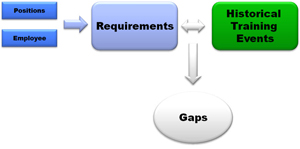
SBS T-Med Database is ISO 13485 compliant software used to track employee training events, position requirements, certification, and re-certification. Report training gaps and key metrics.
Key Features
- Manage Employee Training Records
- Instructor led and self-paced training
- Define Job Descriptions / Roles and Responsibilities
- Define Training requirements
- by position (standard training for each position)
- by employee (special training for each employee)
- for revision controlled documents
- Certification Requirements
- Re-Certification Requirements
- Document revisions trigger training requirements
- Email Reports directly to affected employees
- Electronic signature approvals
- User login: define user passwords and privileges
- CFR21 Part 11 compliant
- Install on your local server or leverage our Cloud QMS solution
Benefits
- Build a simple and effective Quality Management System (QMS / eQMS)
- Efficient and cost effective software
- Simple, low cost solution
- Saves time and improves efficiency
- Training effectiveness
- Defines roles and responsibilities for each position
- Defines require training for each position
- Reports the training status of your workforce with a click of a button
- Archives training / certification test results
- A vital tool to ensure ISO 13485, 21 CFR part 820 compliance
- Paperless: Scan and link class rosters, written tests, or other electronic documents
- Stop chasing paper
Pricing
| License Type | Price |
|---|---|
| Individual User License | $1900 |
| 3-User License | $2400 |
| 5-User License | $2900 |
| Unlimited User License | $3600 |
FREE DOWNLOADS
SYSTEM REQUIREMENTS
- Microsoft Windows XP, Vista, Windows 7, 8, 10, 11
- 64 MB of RAM
- 40 MB of available hard disk space
- Microsoft Access (if you do not have Access installed, you may download a free runtime version from Microsoft by clicking here.
21 CFR part 820 compliance, 21 CFR part 820 compliance software, AS9100, CFR 21 Part 11, database for training, Define Job Descriptions, Define Roles and Responsibilities, Define Training requirements, Employee certification, employee training history, Employee training management, Employee training plan, Employee training software, enterprise quality management software, eqms, EQMS software, ISO 13485, ISO 9001, Job descriptions, Learning Management System, LMS, lms software, manage employee training records, quality management system, track employee roles and responsibilities, tracking employee training, TS16949